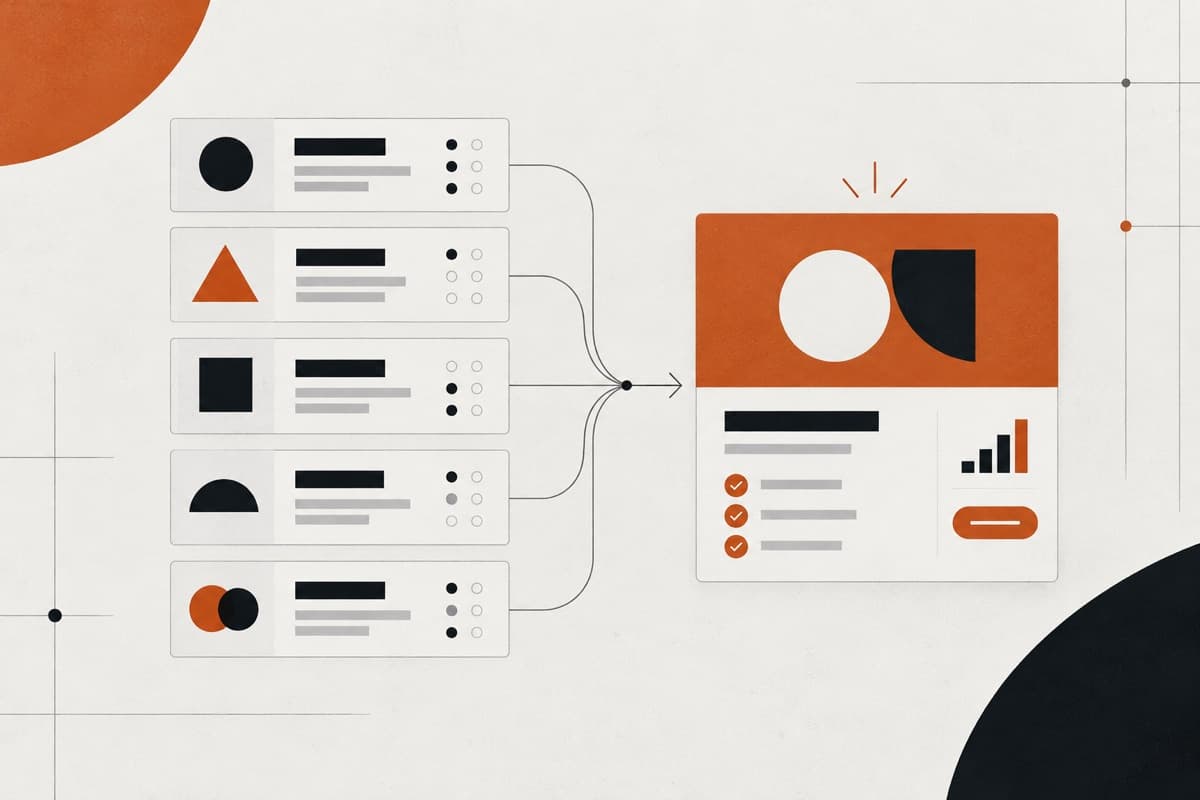
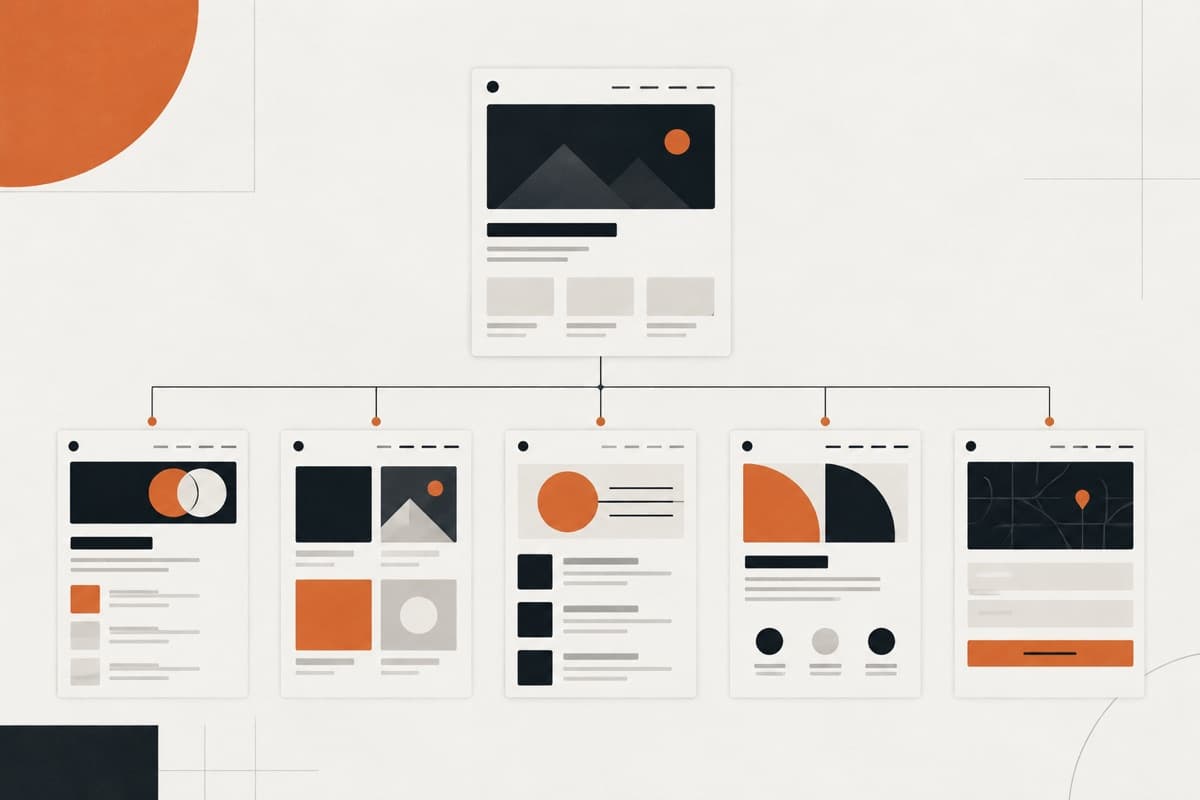
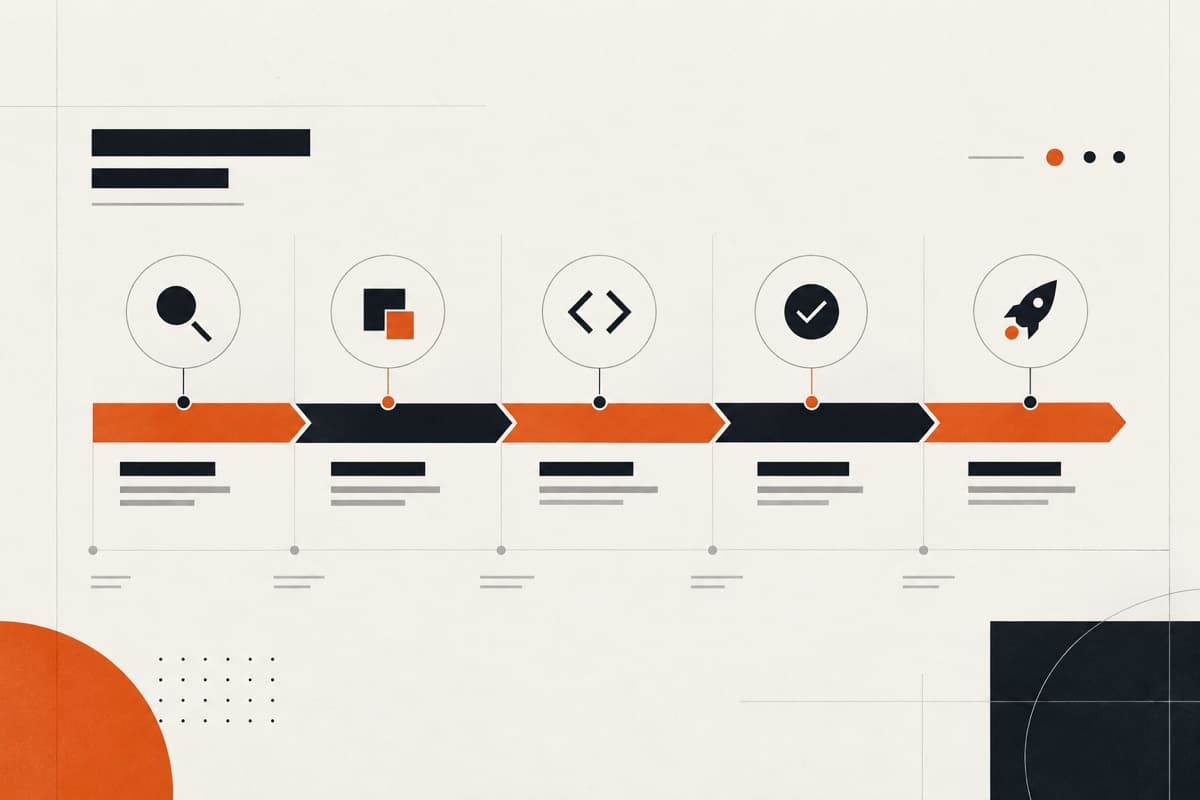
A good website structure organises pages and information into a clear hierarchy that users and search engines can understand. The process starts with business goals and user journeys, then turns them into a content structure, navigation system, URL plan, internal-link network and CMS model.
A client may arrive with 26 existing pages and expect the agency to place them into a new sitemap. That assumes the old structure is correct before anyone has tested whether it supports the business or its users.
Perhaps three service pages should become one. Perhaps one service currently buried two levels deep is commercially more important than everything in the main navigation. Perhaps the organisation's “Solutions Division” means something internally but nothing to a prospective customer.
A redesign should not simply give an old structure a new interface. A client website should be structured around what users need to find or accomplish, while giving appropriate prominence to the client's commercial priorities.
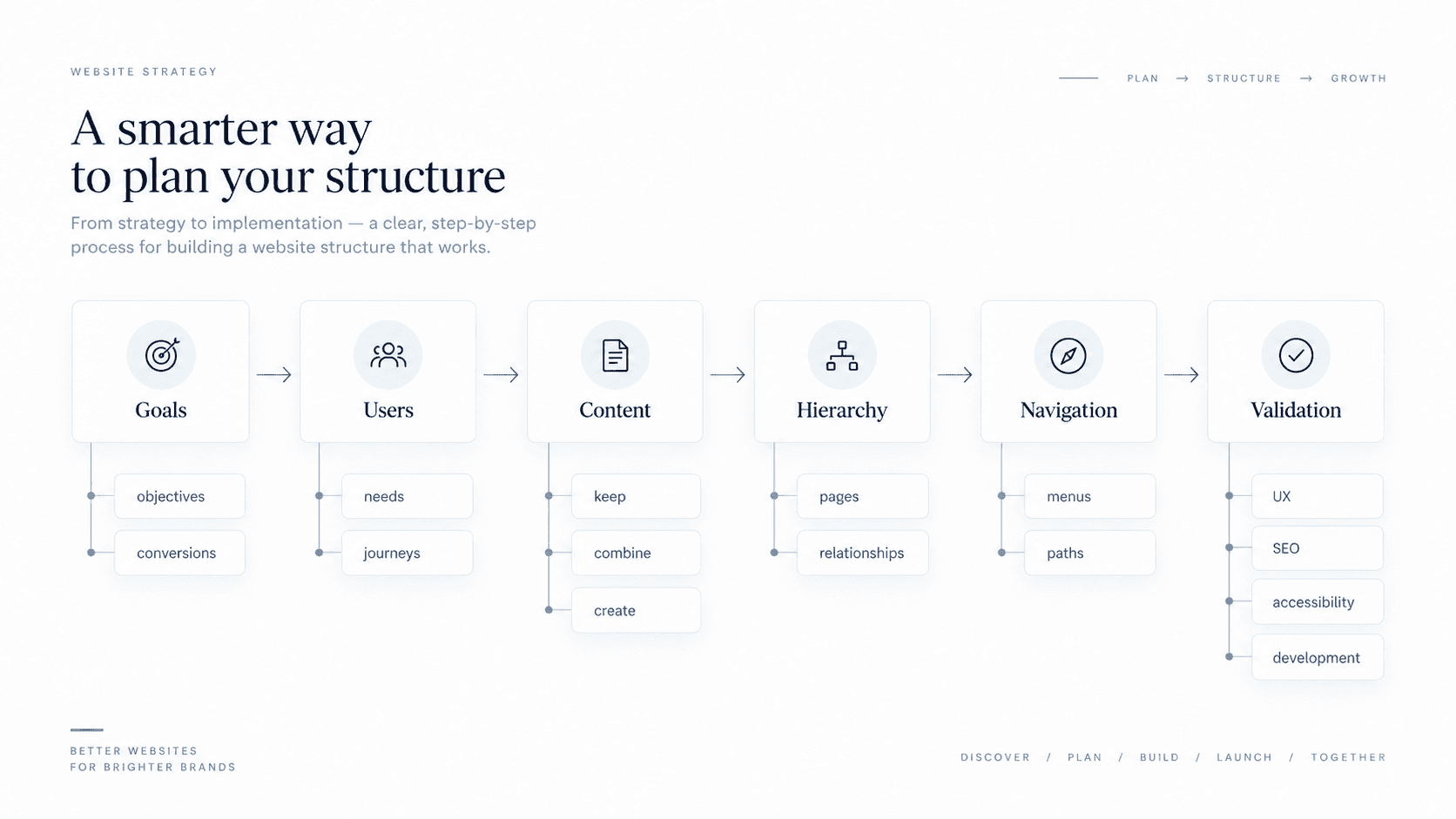
A practical process is:
Goals → Users → Content → Hierarchy → Navigation → Validation
Start by understanding what the site needs to accomplish and who needs to use it. Then decide what information deserves to exist, how that information relates, and only after that determine how users should navigate through it.
The structure should eventually be clear enough that:
- the client understands it;
- the designer can build journeys from it;
- the developer can model the content;
- and the agency can scope the resulting website properly.
What is website structure?
Website structure is the system that determines how a website's information and pages are organised, related and made discoverable to users.
It affects:
- which pages exist;
- how those pages are grouped;
- which pages are more important;
- how users move between them;
- what appears in navigation;
- how content types relate;
- how internal links connect relevant information.
Website structure is therefore more than a list of URLs.
It sits underneath the user experience.
Why is website structure important?
Website structure is important because it influences whether visitors can understand the organisation, find relevant information and move towards a useful next step. It also tells search engines how pages relate, helps editors manage repeatable content and gives designers and developers a system they can scope and build.
| Who it helps | What a clear website structure improves |
|---|---|
| Visitors | Orientation, information finding and confidence about what to do next |
| Business | Prominence for priority services, products, proof and conversion journeys |
| Search engines | Discovery of important pages and understanding of contextual relationships |
| Content teams | Consistent page types, ownership, reuse and sustainable publishing |
| Delivery teams | Clearer templates, CMS relationships, estimates and acceptance criteria |
Google recommends organising a site logically and linking important pages from other relevant pages. W3C accessibility guidance similarly emphasises clear, consistent navigation and orientation cues. Structure therefore affects usability, accessibility, SEO and delivery at the same time.
Information architecture vs sitemap vs navigation: what's the difference?
These terms are related, but they are not interchangeable.
Nielsen Norman Group describes information architecture (IA) as the practice of structuring and organising content, while a sitemap is a visual representation of that organisation. In other words, a sitemap is one possible artefact produced from the information architecture rather than the IA itself.
A useful distinction is:
| Term | What it means |
|---|---|
| Information architecture | The underlying organisation, relationships and labelling of information |
| Sitemap | A visual representation of pages/content and their hierarchy |
| Navigation | The interface people use to move through the site |
| URL structure | The addresses through which pages are accessed |
For example:
Your IA might establish that Case Studies are related to both Industries and Services.
Your sitemap shows where the Case Studies section sits.
Your navigation might expose “Work” in the main menu.
Your URLs might use:
`/case-studies/example-project/`
These systems should support one another, but they solve different problems.
What makes a good website structure?
A useful website structure should do several things at once.
It should help users:
- understand what the organisation offers;
- predict where information will be;
- reach important information without unnecessary friction;
- move naturally towards relevant next steps.
It should help the business:
- give appropriate prominence to priority services or products;
- support important customer journeys;
- organise content sustainably;
- support future expansion.
And it should help the delivery team:
- define page types;
- design navigation;
- model CMS content;
- identify reusable templates;
- estimate design and development.
That is why structure should normally be decided before detailed visual design begins. A website design partner can then turn the approved hierarchy into wireframes and responsive UI instead of resolving the strategy gradually inside Figma.
1. Start with what the website needs to accomplish
Do not begin with pages.
Begin with purpose.
Ask:
- Why does this website project exist?
- What business priorities should the new website support?
- Which services or products matter most?
- What should visitors do?
- Which conversions matter?
- Which audience groups are commercially important?
- What is wrong with the current website?
Suppose a consultancy offers ten services.
The current website treats all ten equally.
During discovery, however, the client explains that three services represent most of its planned growth.
That information should influence the architecture.
Perhaps those three services deserve:
- greater prominence;
- deeper supporting content;
- stronger proof;
- clearer pathways from relevant industry pages.
The structure communicates priority before the visual design does.
2. Identify the main users and their journeys
A client's organisational structure and a user's mental model are rarely identical.
The company might think in terms of:
- Business Unit A;
- Solutions Division;
- Innovation Department.
A prospective customer is more likely thinking:
I have this problem. Can this company solve it?
That is why one of the most important structural questions is:
Who is using the website, what are they trying to accomplish, and what information do they need along the way?
Consider a professional-services site.
Prospective client
Home → Service → Relevant case study → Contact
Existing customer
Resources → Documentation → Support
Candidate
Careers → Vacancy → Application
These are journeys.
They help the agency see the website as a connected system rather than a collection of pages.
Website structure should follow user understanding, not the organisational chart
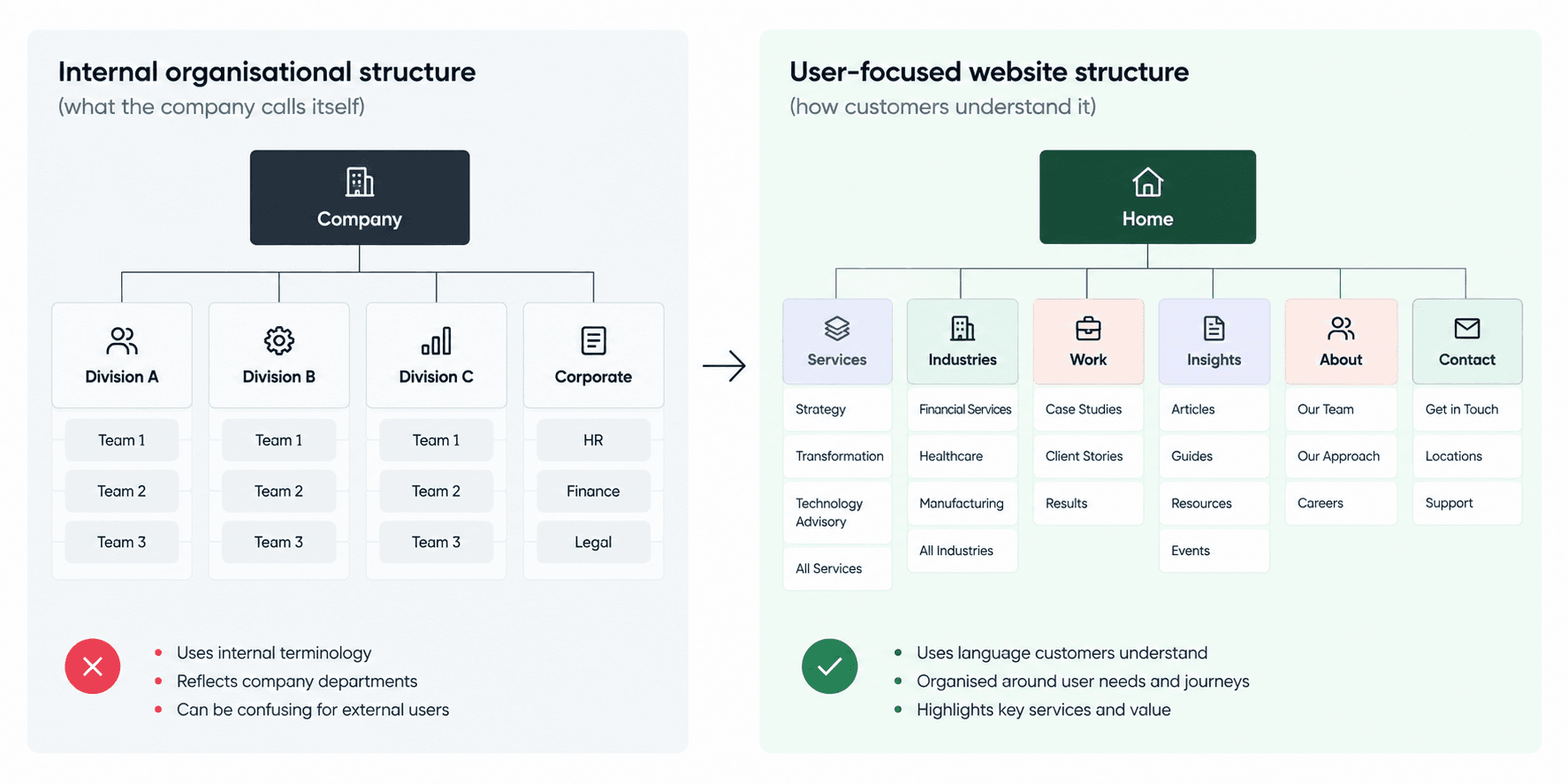
This is one of the most common structural mistakes.
Imagine a client proposes this navigation:
- Home
- Corporate
- Division A
- Division B
- Division C
- Knowledge Centre
- Contact
Internally, those divisions may make perfect sense.
Externally, users may have no idea which division contains the service they need.
The internal structure is still useful discovery information.
It simply should not automatically become the website structure.
A good agency translates:
how the company is organised
into:
how users understand what the company does.
3. Inventory and group the content
Once goals and journeys are understood, determine what information needs to exist.
For an existing website, begin with a content inventory.
Possible decisions include:
Keep
Content remains useful and accurate.
Improve
The subject remains important but the content needs rewriting or restructuring.
Combine
Several weak or overlapping pages become one stronger resource.
Remove
Content no longer serves a meaningful purpose.
Create
A clear information gap needs new content.
Do not treat the old sitemap as sacred.
The redesign is an opportunity to ask:
If this page did not already exist, would we create it today?
That question can reveal a lot of legacy clutter.
Distinguish content types from individual pages
This matters both strategically and technically.
Suppose a website contains:
- 40 case studies;
- 12 team members;
- 80 articles.
That does not necessarily mean the agency needs to design 132 different layouts.
Instead, these might become:
Case Studies
One content type with a reusable detail template.
Team Members
One structured content type.
Insights
One article structure, perhaps with different taxonomies.
This distinction affects:
- information architecture;
- CMS modelling;
- design effort;
- development scope;
- pricing.
A sitemap showing individual pages is useful, but the agency should also identify the content model underneath them.
4. Decide what deserves its own page
Not every subject needs a separate URL.
Equally, not every important service should be squeezed onto one enormous page.
Create a standalone page when there is a meaningful reason for the content to exist independently.
Possible reasons include:
- distinct user intent;
- a genuinely separate service or product;
- enough unique information to justify a page;
- a different conversion path;
- an important audience need;
- meaningful search demand;
- regulatory or operational requirements.
For example, suppose an agency client sells:
- ecommerce strategy;
- Shopify development;
- Shopify maintenance.
If each service solves a genuinely different problem and requires different proof, process and conversion messaging, separate pages may be useful.
But creating:
- Shopify Development London
- Shopify Development Manchester
- Shopify Development Birmingham
with near-identical content purely because somebody wants more SEO pages is a very different decision.
Search demand can inform architecture.
It should not be allowed to manufacture weak pages with no distinct user purpose.
5. Build a logical hierarchy
Once the content has been defined, organise it.
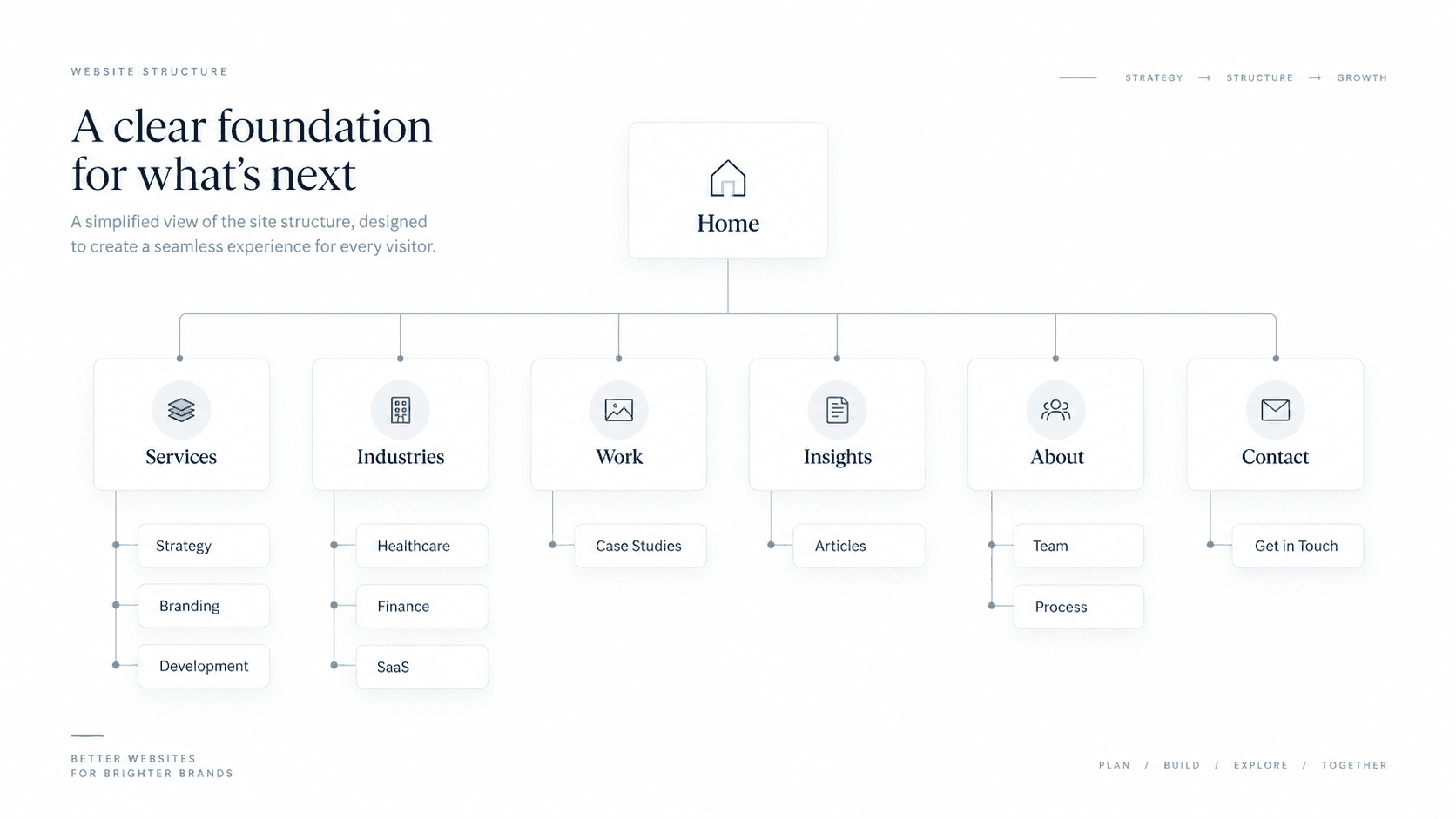
For example:
Home
Services → Strategy → Branding → Website Design → Development
Industries → Healthcare → Financial Services → SaaS
Work → Case Studies
Insights
About
Contact
This is only an example.
A different business may need a completely different model.
The important questions are:
- Are related pages grouped logically?
- Are important destinations easy to reach?
- Do category names make sense without internal company knowledge?
- Can the hierarchy expand without becoming confusing?
- Do users understand what they will find beneath each section?
Google's current Search Central guidance similarly recommends a logical structure that is easy for users to navigate, with important pages linked from other relevant pages.
How deep should a website hierarchy be?
There is no universal rule that every page must be exactly two or three clicks from the homepage.
A 12-page marketing website and a retailer with 50,000 products should not have the same architecture.
Flattening everything can be just as confusing as making the hierarchy excessively deep.
Instead ask:
- Are high-priority journeys reasonably direct?
- Can users predict where information belongs?
- Are important pages linked from relevant places?
- Does each level add meaningful organisation?
- Can users understand where they are?
For large sites, deeper hierarchy can be entirely appropriate when each level genuinely helps classify information.
The objective is clarity, not achieving an arbitrary click count.
6. Design navigation from the structure
Once the hierarchy is understood, decide how people should move through it.
This is different from deciding the architecture itself.
A website might contain 70 pages.
That does not mean 70 items belong in its primary navigation.
The main navigation should expose the routes users need most frequently or most importantly.
Other content can be reached through:
- secondary navigation;
- footer navigation;
- contextual links;
- breadcrumbs;
- search;
- content hubs.
W3C's accessibility guidance recommends clear and consistent navigation and notes that, depending on the site, multiple ways of locating content—such as navigation, search or a site map—can help different users find information.
A sitemap is not the navigation menu
This distinction is worth making explicit.
Sitemap
Represents the structure of the website.
Navigation
Exposes selected routes into that structure.
Suppose the sitemap contains:
Services → Service A → Service B → Service C
Industries → Healthcare → Finance → Education
Case Studies → 25 individual case studies
Insights → 80 articles
The main navigation might simply contain:
Services | Industries | Work | Insights | About | Contact
That is perfectly normal.
The menu does not need to reproduce the full sitemap.
Should you use audience-based or service-based navigation?
This is a common trade-off.
Imagine a software consultancy serves:
- startups;
- enterprise organisations;
- public-sector teams.
And offers:
- strategy;
- product design;
- software development.
Should the site be organised primarily by:
Audience
or:
Service?
There is no universally correct answer.
Ask:
- How do users describe what they need?
- Do audiences have genuinely different problems?
- Are services understood independently?
- Which structure better reflects the business's commercial priorities?
- Would both structures create meaningful, distinct content?
A sensible architecture might use:
Primary: Services
and supporting pages such as:
Solutions for Startups
if those audience pages genuinely add useful information.
Avoid creating two sets of almost identical pages simply because both structures look attractive in a diagram.
7. Build contextual internal linking into the architecture
Site structure does not exist only in the header.
Links between relevant pages also communicate relationships.
For example:
Service page
→ related case studies
Case study
→ services used on the project
Industry page
→ relevant services + proof
Article
→ related educational content + relevant service
These pathways help users continue naturally through the site.
They also help search engines understand how pages relate.
Google advises that pages you care about should be linked from at least one other page on the site and recommends concise, relevant internal anchor text.
That makes internal linking an architecture decision, not merely a post-launch SEO task.
What is the best website structure for SEO?
The best website structure for SEO is logical, easy to navigate and explicit about how important pages relate. Good search architecture and good user architecture therefore often overlap.
Both benefit from:
- clear page relationships;
- descriptive labels;
- discoverable important pages;
- contextual internal links;
- logical grouping.
Google's SEO Starter Guide says organising a site logically can help users and search engines understand how pages relate. For very large sites, grouping similar pages into directories can also help Google understand parts of the site.
But avoid designing the architecture solely around keywords.
A site where every minor keyword variation becomes another page can create:
- duplicated information;
- weak content;
- confusing navigation;
- unnecessary maintenance.
SEO should inform the structure.
It should not override the user's understanding of the site.
Should the URL structure mirror the website hierarchy?
URLs should normally be:
- readable;
- descriptive;
- stable;
- understandable.
Google currently recommends simple URL structures and descriptive words rather than opaque identifiers.
For example:
`/services/shopify-development/`
is more understandable than:
`/page?id=8421`
But do not assume the URL folder structure is the only thing telling Google—or users—how the website is organised.
Page relationships are also communicated through:
- navigation;
- breadcrumbs;
- internal links;
- content relationships.
This matters particularly during redesigns.
If an existing website already has valuable, established URLs, changing all of them purely to create a visually cleaner directory structure may create migration work without enough benefit to justify it.
Structure URLs sensibly.
Do not redesign them cosmetically without considering migration consequences.
How does accessibility affect website structure?
Accessibility should influence the structure before development begins.
W3C notes that navigation helps users understand where they are and move somewhere else, while descriptive headings and clear structure can help users orient themselves.
For larger websites, useful structural mechanisms may include:
- consistent navigation;
- descriptive page names;
- clear heading structures;
- breadcrumbs;
- site search;
- multiple routes to important content.
W3C's WCAG guidance on “Multiple Ways” also recognises that different users may prefer different ways of finding content rather than relying exclusively on one hierarchical navigation system.
Good website structure therefore contributes not only to:
- SEO;
- conversion;
- usability;
but also to whether different users can orient themselves and find what they need.
How should website structure influence the CMS?
This is where website strategy starts affecting development architecture.
Imagine the site contains:
- Services;
- Industries;
- Case Studies;
- Team Members;
- Locations;
- Insights.
The agency should decide whether these are:
- static pages;
- reusable page templates;
- CMS collections;
- structured custom content types.
Then consider relationships between them.
For example, a case study might contain:
Client: Example Ltd Industry: Healthcare Services: Brand Strategy + Website Development
The CMS could use those relationships to surface the same case study automatically on:
- the Healthcare industry page;
- Brand Strategy;
- Website Development.
That creates a connected website architecture rather than a set of manually maintained pages.
It can also influence:
- design templates;
- CMS fields;
- development effort;
- project scope.
This is another reason to settle the structure before development estimates are finalised.
How should you structure an existing website redesign?
A redesign needs more care than a new site because the current structure already has history.
Existing pages may have:
- organic rankings;
- backlinks;
- bookmarks;
- paid campaign links;
- analytics history;
- internal links;
- customer familiarity.
So before deleting or consolidating pages:
- inventory existing URLs;
- understand what content still serves a purpose;
- review available performance information where relevant;
- identify pages being retained;
- identify pages being merged or removed;
- plan URL changes and redirects where required.
The strategic question remains:
What should the future structure be?
But the implementation question becomes:
How do we move from the old structure to the new one without unnecessarily losing useful existing signals or user routes?
A redesign should improve the architecture without pretending the existing website never existed.
A practical website structure example
Imagine a B2B consultancy.
Its current website follows the organisation internally:
Home
Company
Division One
Division Two
Division Three
Solutions
News
Contact
During discovery, the agency learns that customers do not talk about the divisions.
They come looking for three specific outcomes:
- strategy consulting;
- business transformation;
- technology advisory.
The company also has strong sector expertise and relevant case studies.
A possible user-facing structure becomes:
Home
Services → Strategy → Transformation → Technology Advisory
Industries → Financial Services → Healthcare → Manufacturing
Work → Case Studies
Insights
About
Contact
Now relationships can be built across sections.
A healthcare visitor might follow:
Healthcare → Transformation → Healthcare case study → Contact
That is a much more intentional journey than simply exposing “Division Two” because that is what the company calls the team internally.
The organisation's internal structure is an input. It does not automatically deserve to become the website's navigation.
Common website-structure mistakes
| Mistake | Why it creates problems |
|---|---|
| Mirroring internal departments | Users may not understand internal terminology |
| Designing the menu before the IA | Header limitations start driving strategy |
| Keeping every legacy page | Old structural problems survive the redesign |
| Flattening everything | Relationships between content become unclear |
| Creating unnecessary depth | Important pages become harder to locate |
| Leaving pages poorly linked | Important content becomes harder to discover |
| Using vague menu labels | Users cannot predict what sits behind them |
| Creating pages only for keywords | Can produce thin or duplicated content |
| Treating the sitemap as complete scope | Templates, functionality and CMS requirements remain undefined |
| Ignoring content relationships | Development becomes harder to model and maintain |
What should not determine the website structure?
The client's organisational chart
Useful discovery material.
Not necessarily user-friendly navigation.
The existing website
Useful inventory.
Not automatically the structure worth preserving.
A competitor's navigation
Useful reference.
Not a substitute for understanding your client's users.
What fits neatly in the header
Architecture should inform navigation design, not be constrained prematurely by it.
A page count already sold in the proposal
Particularly dangerous.
If an agency sells:
10-page website
before properly determining what the site needs, the architecture may later be distorted to fit the arbitrary number.
Structure should help determine scope.
Not the reverse.
How should you validate a proposed website structure?
Before moving into detailed design, review the structure from several perspectives.
User
Can each important audience find the information they need?
Business
Are priority services, products and conversion paths sufficiently visible?
Content
Does each proposed page have a clear reason to exist?
Navigation
Can users predict where information will be found?
SEO
Are important pages discoverable through logical internal links?
Accessibility
Can people orient themselves and use appropriate routes to locate content?
CMS
Can repeatable content be managed logically?
Development
Can the delivery team identify:
- page types;
- templates;
- content relationships;
- technical requirements?
If the answers remain unclear, the structure may not be ready for design.
Website Structure Checklist
Before approving the sitemap, check:
Goals
- Is the website's primary objective clear?
- Are priority services/products understood?
- Are important conversions identified?
Users
- Are the main audience groups known?
- Is each group's primary task understood?
- Are important user journeys mapped?
Content
- Has existing content been inventoried?
- Is it clear what stays, changes, combines or disappears?
- Have new information gaps been identified?
Pages
- Does every major page have a distinct purpose?
- Are unnecessary duplicate pages avoided?
- Are content types separated from individual page instances?
Hierarchy
- Are related pages grouped logically?
- Are labels understandable to users?
- Are priority destinations easy to reach?
Navigation
- Does primary navigation expose the most useful routes?
- Are secondary/footer/contextual routes planned?
- Are breadcrumbs or search appropriate for the site's scale?
Internal linking
- Are related services, proof and content connected?
- Are important pages linked from relevant places?
Technical
- Does the structure inform the CMS model?
- Are reusable page types identifiable?
- Can design/development reasonably scope the work?
Existing site
- Have valuable existing URLs been considered?
- Are structural changes going to require migration or redirects?
What happens after the website structure is approved?
The sitemap is not the end of website strategy.
It becomes an input into the next stages.
A sensible sequence is:
Client brief ↓ Goals and user journeys ↓ Information architecture / website structure ↓ Sitemap and content model ↓ Wireframes ↓ Project scope ↓ Visual design ↓ Development
There can be iteration between those stages.
A wireframe may expose a structural problem.
Technical discovery may reveal a constraint.
Content may change.
The important thing is that detailed UI design should not be carrying all the responsibility for deciding what the website is.
Website structure FAQs
Should website structure be planned before design?
Yes. The structure should be clear enough to identify priority journeys, pages, content types and navigation before detailed visual design begins. Wireframes may reveal improvements, but Figma should not be the first place the team decides what information exists or how it relates.
How many levels should a website structure have?
There is no universal number. Use the shallowest hierarchy that remains understandable for the content and audience. Important destinations should not be buried unnecessarily, but forcing every page into one level can produce an equally confusing navigation system.
Is a sitemap the same as website structure?
No. A sitemap represents pages and hierarchy, while website structure also includes page relationships, navigation, URLs, internal links, reusable content types and the routes visitors use to complete tasks.
How does website structure support SEO?
A logical structure helps crawlers discover important URLs and gives internal links meaningful context. It also helps teams avoid isolated pages, overlapping content and unclear hierarchies. Structure supports SEO, but it does not replace useful content, descriptive titles or technically accessible pages.
What should an agency deliver after planning the structure?
The output normally includes an approved sitemap, priority journeys, page-purpose notes, reusable page types, navigation rules, URL decisions, internal-link relationships and an initial CMS model. These artefacts can then be turned into a clear website scope and client brief.
What should your agency take away?
A good website structure is not the sitemap with the neatest boxes.
It is the structure that makes the organisation understandable to the people using the website.
Start with:
- business goals;
- users;
- journeys;
- content.
Then determine:
- page types;
- relationships;
- hierarchy.
Then design:
- navigation;
- internal linking;
- CMS structures.
Finally, validate whether the structure makes sense from the perspective of:
- users;
- business;
- accessibility;
- SEO;
- design;
- development.
Start with goals and user needs, organise the content, create the hierarchy, then design navigation around it—not the other way around.
For an agency, there is one additional test:
Can this structure now be turned into a clear website scope?
If not, it probably needs more work before the project is priced or detailed design begins.
Oncreation works with agencies as a behind-the-scenes website delivery partner and can support projects across website strategy, information architecture, UI/UX, development, QA and launch while the agency retains ownership of its client relationship.
Sources
Nielsen Norman Group — Information Architecture vs. Sitemaps
Used for the distinction between information architecture and a sitemap, and for defining a sitemap as a visual representation rather than the complete IA.
Nielsen Norman Group — Information Architecture vs. Navigation
Used for the distinction between the underlying information architecture and the navigation interface that exposes parts of it.
Google Search Central — Sitelinks
Used for current guidance on creating logical site structures and linking important pages from other relevant pages.
Google Search Central — Link Best Practices
Used for current guidance around internal links and ensuring important pages have links from other discoverable pages.
Google Search Central — URL Structure Best Practices
Used for current guidance around simple, descriptive and readable URLs.
Google Search Central — SEO Starter Guide
Used for guidance on logical site organisation and grouping related content.
W3C Web Accessibility Initiative — Multiple Ways
Used for current accessibility guidance on providing multiple ways to locate web pages where applicable.
W3C Web Accessibility Initiative — Designing for Web Accessibility
Used for guidance around clear, consistent navigation and orientation mechanisms such as breadcrumbs, search and headings.
W3C Web Accessibility Initiative — Page Structure
Used for guidance on logical content structure, headings and navigation/orientation within pages.
Turn the guidance into a dependable delivery system.
Oncreation works behind agencies on website structure, custom UI, development, QA and launch—with the agency remaining in control of its client relationship.